Invoicing
From unbilled hours to a client-ready PDF in one command — with the billing math explicit and the history immutable.
How an invoice is built
invoice create gathers the client's uninvoiced, billable entries in the
period and groups them into line items — one per project per day (e.g.
"API Rewrite — 3 entries"). Each line's duration is rounded per your
billing config, priced at the
resolved rate, and the
rate is frozen onto the invoice so later rate changes never rewrite history.
Creating an invoice
$ ttd invoice create --client acme-corp              # last calendar month
$ ttd invoice create --client acme-corp --month 2026-05
$ ttd invoice create --client acme-corp --from 2026-05-15 --to 2026-05-31
$ ttd invoice create --client acme-corp --number 2026-CUSTOM-1
-i opens a form with a live total preview instead.
Preview with --dry-run
Prints the line items, subtotal, tax, and total — and changes nothing.
Rendering PDF and Markdown
Render at creation time with --pdf and/or --md, or any time later:
$ ttd invoice create --client acme-corp --pdf --md
$ ttd invoice render 2026-001                 # re-render both
$ ttd invoice render 2026-001 --pdf --out ~/Desktop
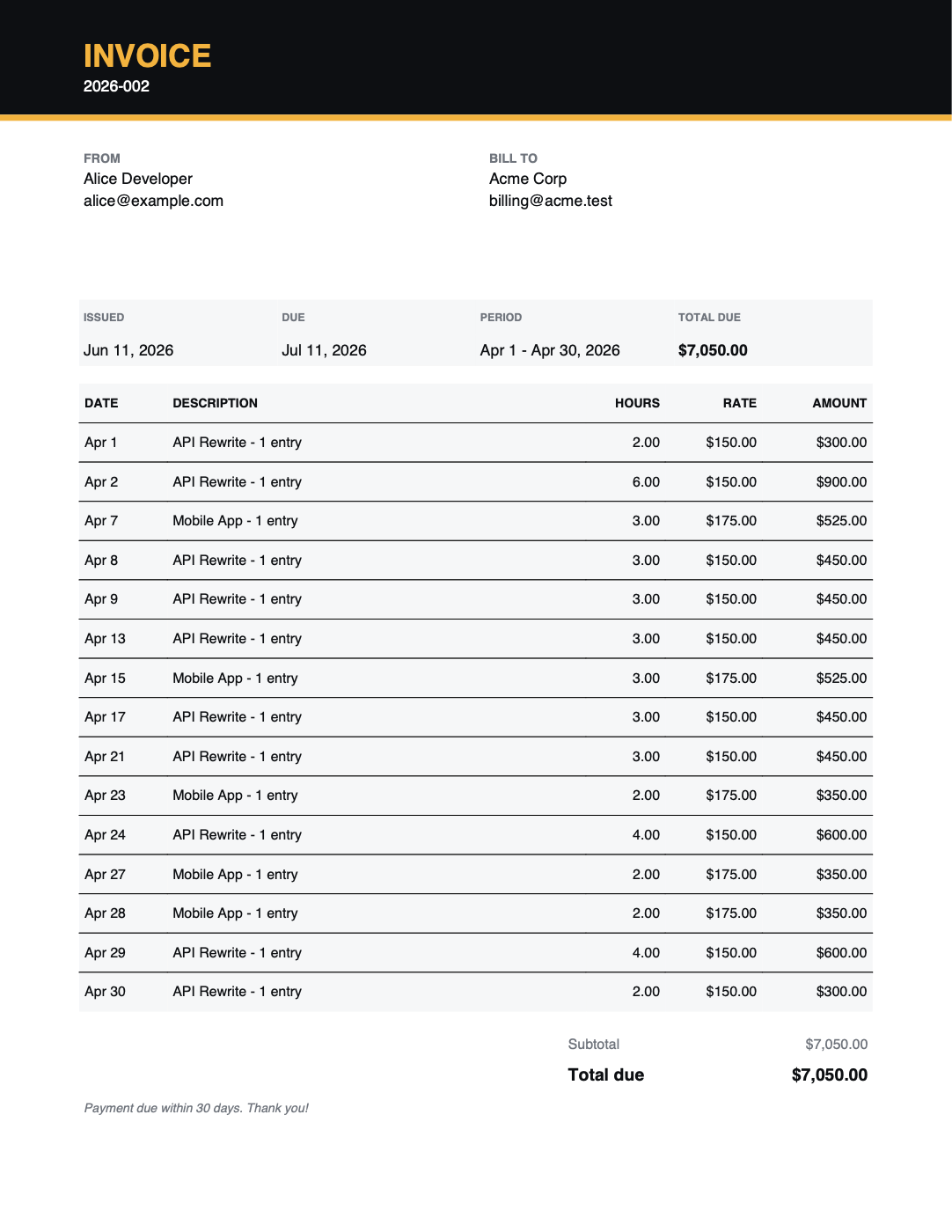
Files are named {number}-{client-slug}.pdf / .md and written to
invoice.output_dir (~/Documents/invoices by default). The PDF is a clean
single-page letterhead layout; the Markdown comes from a template, handy for
pasting into email or converting with pandoc.
The invoice lifecycle
| Status | Meaning |
|---|---|
draft |
Created; entries are locked to it |
sent |
Issued to the client |
paid |
Payment received — tax set-aside is frozen at this moment |
void |
Cancelled — its entries are released for re-invoicing |
$ ttd invoice mark 2026-001 sent
$ ttd invoice mark 2026-001 paid --paid-date 2026-06-09
$ ttd invoice mark 2026-001 void
--paid-date defaults to today; correcting it re-freezes the set-aside into
the right tax quarter. Voided invoices keep their number forever — numbers
are never reused.
Reviewing invoices
$ ttd invoice list            # newest first: number, client, period, total, status
$ ttd invoice show 2026-001   # line items, dates, subtotal/tax/total, set-aside
Invoice numbering
Numbers come from the invoice.number_format template — default
{year}-{seq:03d} → 2026-001, 2026-002, … The sequence increments within
whatever fields you use:
Available fields: {year}, {month}, {seq}.
Customizing your invoices
All in config:
user.name/user.email/user.address— the FROM blockinvoice.payment_terms_days— due date, 30 days by defaultinvoice.tax_rate— tax added to the subtotal, as a fraction (0.08= 8%)invoice.output_dir— where rendered files gobusiness.currency(and per-client currency) — amounts and symbols
Billing rounding
Rounding applies to each line item's rolled-up daily duration:
billing.increment_minutes— the granularity, 15 minutes by defaultbilling.rounding—nearest(default),up, ornone
A project-day totalling 1h07m bills as 1h00m with nearest, 1h15m
with up, and exactly 1h07m with none. What you log is never changed —
only what's billed.
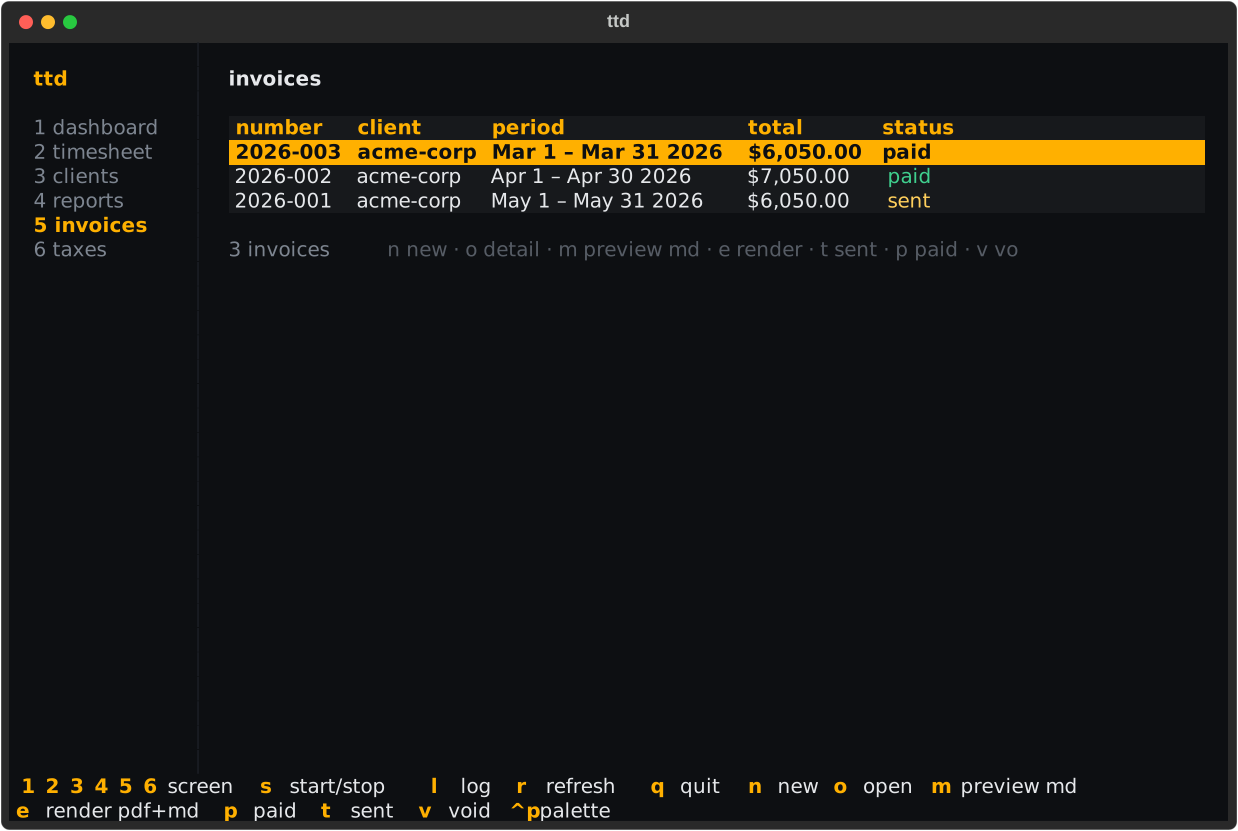
Invoices in the TUI
Screen 5 lists invoices with status pills:
| Key | Action |
|---|---|
n |
new invoice (pick client, live-preview period) |
o |
open line-item detail |
m |
preview the Markdown render |
e |
render PDF + Markdown files |
t / p / v |
mark sent / paid / void |