Clients & projects
Work is organized two levels deep: clients you bill, and projects
under them that you log time against. Both are referred to everywhere by
their slug — a short kebab-case id generated from the name (Acme Corp →
acme-corp) that you can override with --slug.
Clients
Adding a client
--rate sets the client's default hourly rate, --currency its currency
(defaults to business.currency, USD out of the box). --contact,
--email, and --address appear in the BILL TO block of invoices.
ttd client add -i asks for all of it in a form.
Listing and editing
$ ttd client list             # add --archived to include archived clients
$ ttd client edit acme-corp --rate 175 --contact "Jane Doe"
Archiving vs deleting
ttd client archive SLUGhides the client from lists and pickers; all history (entries, invoices) is kept. This is almost always what you want.ttd client rm SLUGdeletes. It refuses if the client has projects;--forcedeletes the projects and their entries too. Gone is gone.
Projects
Adding a project
Without --rate, the project inherits the client's rate (project lists show
that as "(client)"). With defaults.client set in config, --client is
optional.
Listing, editing, archiving
$ ttd project list                    # hours logged + unbilled work per project
$ ttd project list --client acme-corp
$ ttd project edit api-rewrite --rate 175
$ ttd project archive api-rewrite
How hourly rates resolve
When an invoice prices an hour of work, the rate comes from the first level that defines one:
- the project's rate, if set
- otherwise the client's rate
- otherwise
business.default_hourly_ratefrom config
If none of the three is set, invoice creation fails rather than billing at zero. The resolved rate is frozen onto the invoice at creation — editing rates later never changes existing invoices.
Default client and project
Set-and-forget for single-client stretches:
Now ttd log "2h" and ttd start need no flags. Combined with a per-repo
.ttd.toml, each codebase can map to its own project — see
Configuration.
Interactive forms
Every creating/editing command accepts -i to open a form; flags you pass
pre-fill it. Useful when you don't remember the option names.
Managing from the TUI
Screen 3 shows the portfolio as a tree — clients with their projects,
rates, and unbilled hours:
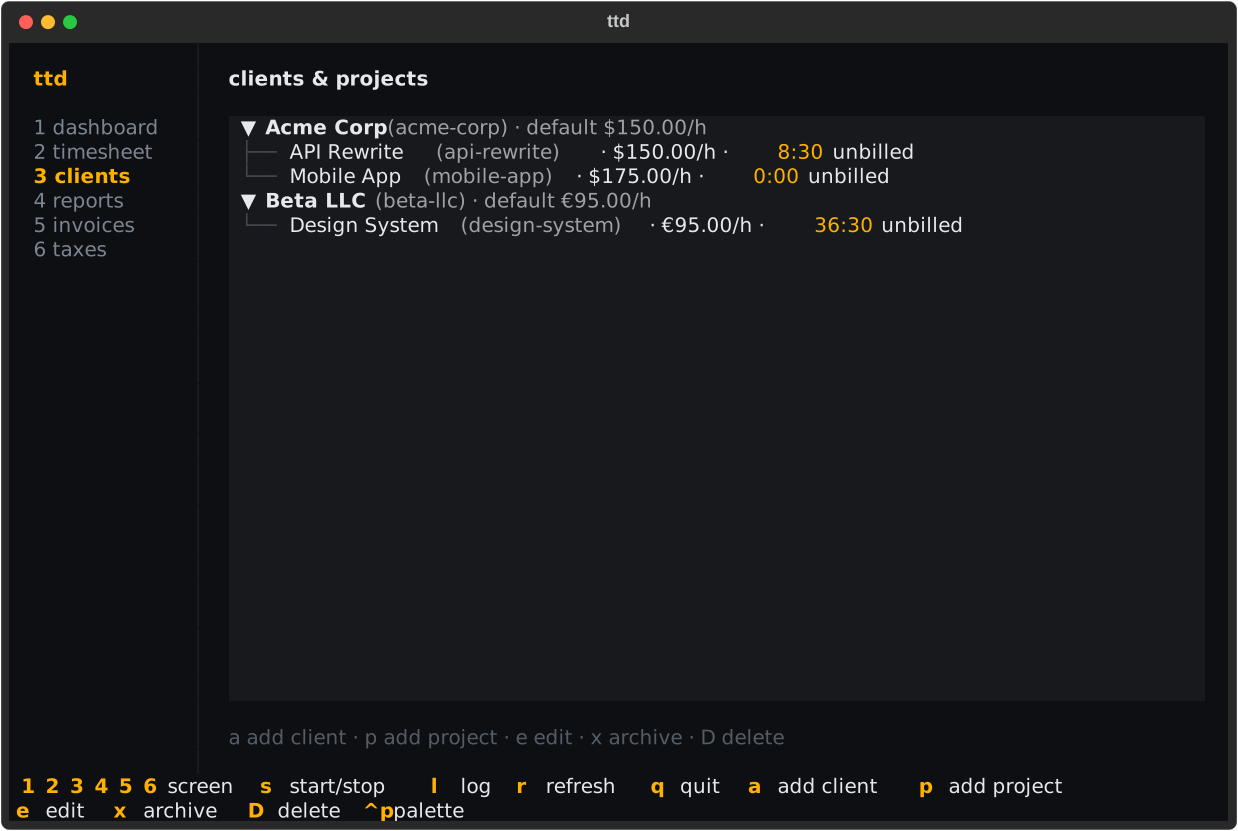
| Key | Action |
|---|---|
a |
add a client |
p |
add a project under the selected client |
e |
edit the selected client/project |
x |
archive the selected item |
D |
delete the selected item (confirms first) |