TTD
Terminal-first time tracking, reporting, and invoicing for solo developers.
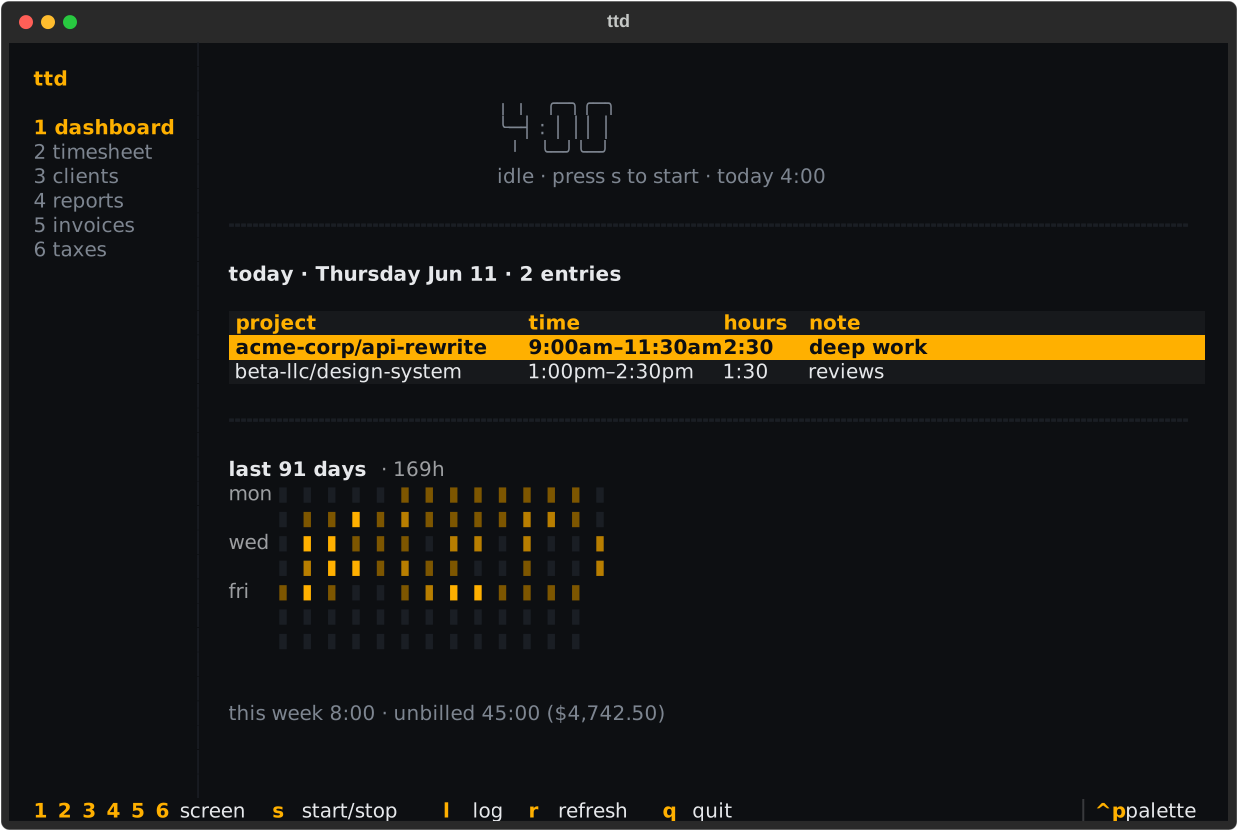
What is ttd
ttd turns logged hours into client-ready invoices without leaving your terminal. Track time with a live timer or plain English ("today 9am to noon"), see where the week went, invoice a client's unbilled work in one command, and set a slice of every paid invoice aside for estimated taxes.
Everything lives in a single local SQLite file — no accounts, no sync, no browser.
The three ways in
Everything works three ways; pick per task:
- Direct commands —
ttd log "yesterday 2h" -p api-rewrite. Fast, scriptable. - Interactive forms — add
-ito any creating command (ttd client add -i) and a form asks for whatever you didn't pass as flags. - The TUI — bare
ttdopens a full-screen dashboard with a timer, timesheet, reports, invoices, and tax tracking. See The TUI.

Install in one line
More options (pipx, pip, shell completion) in Installation.
Try it with demo data
Seeds demo clients, projects, and ~3 months of entries so every screen has
something to show. Point TTD_DB_PATH at a throwaway file to keep it out of
your real ledger.
Where to go next
- Quickstart — zero to your first invoice in ten minutes
- Tracking time — timers, natural-language logging, editing
- Invoicing — from unbilled hours to a rendered PDF
- The TUI — the full-screen interface
- CLI reference — every command and flag